
Grade 10 · Practical
The Delphi IDE and components
Introduction to Programming (Delphi) · about 4 min
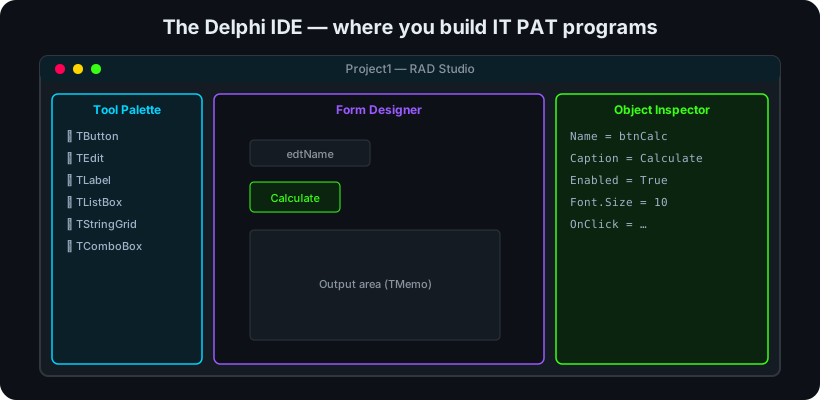 The Delphi IDE: tool palette, form designer and object inspector.
Delphi is a Rapid Application Development (RAD) environment: you drag visual components onto a form, set their properties, and write code that responds to events.
Key points- The Form Designer is your app's window; the Tool Palette holds components (TButton, TEdit, TLabel, TListBox, TMemo).
- The Object Inspector sets a component's properties (Name, Caption, Enabled) and wires its events (OnClick).
- Name components meaningfully with a prefix: btnCalc, edtName, lblResult, redOutput.
- Code lives in event handlers — e.g. the button's OnClick procedure runs when the user clicks it.
- Component — a reusable visual/non-visual building block placed on a form.
- Property — a setting of a component (its Caption, colour, size).
- Event — something that happens (a click, a keypress) that your code can respond to.
EXAM TIP
know the standard component prefixes and which property vs event you'd change — e.g. the button's text is Caption, its action is OnClick.